

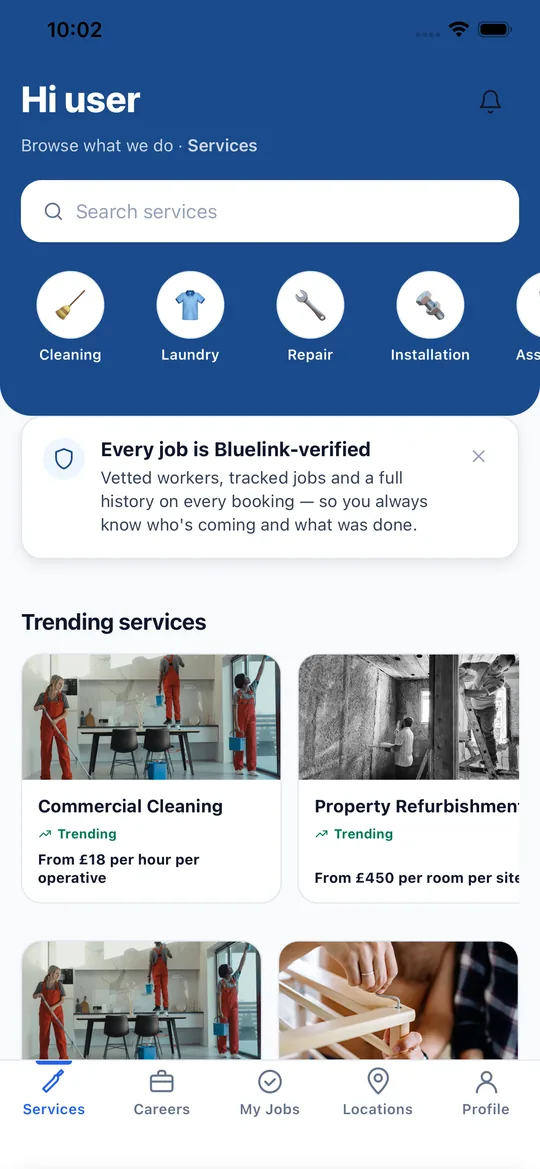
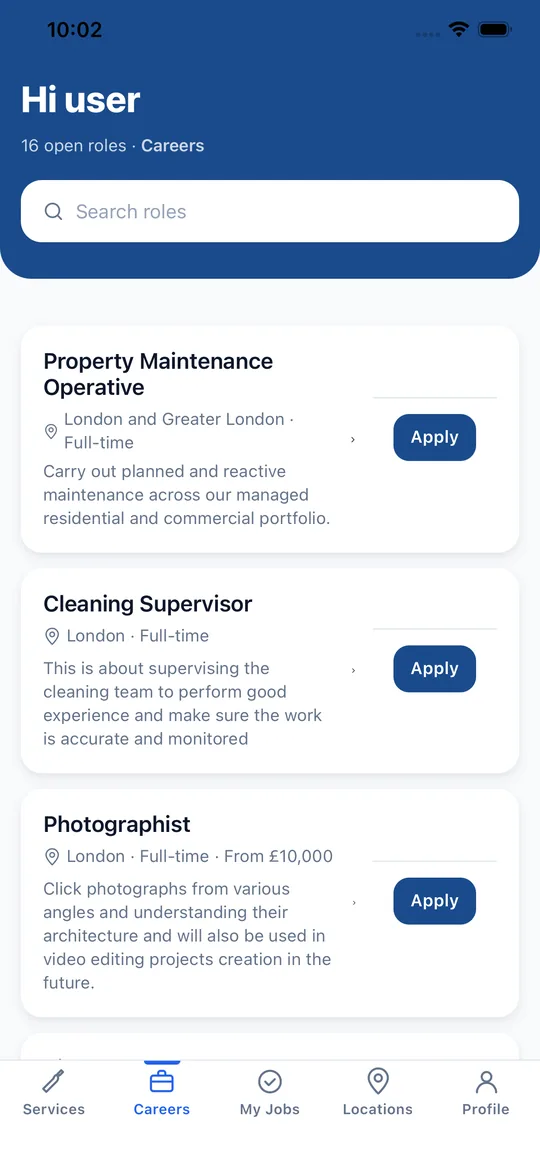
Live on iOS and Android

Bluelink WorkForce.
Everything it does, and what you get.

The app is the front door to an AI software project. It runs jobs and shifts, card compliance, site project management and hiring for workers, companies, individuals and clients. Here is what each part does and who gets what.

Download Bluelink WorkForce on the App StoreGet Bluelink WorkForce on Google Play
What the app does

Everything a workforce needs, in one app.

Jobs and shifts, card compliance, site project management and a jobs board, with the paperwork handled for you.

Jobs, shifts and pay

Every assigned job with its date, place and client contact, from acceptance to timesheet.

  • See each assigned job with its date, address and the client’s phone and email.
  • Accept a job, then mark yourself arrived, started and complete as the work happens.
  • Set the days and hours you are available so the Bluelink team can schedule you.
  • Clock in and out to build timesheets, log expenses and open your payslips.
  • Share your location so the Bluelink team can dispatch the nearest cleared worker.

Cards and compliance

CSCS and every other card in one place, with reminders before anything expires.

  • Add CSCS (with its colour level), SSSTS, SMSTS, CPCS, IPAF, PASMA, SIA, Gas Safe, first aid or any other card, with the number, expiry date and front and back photos.
  • Open, replace and download your card photos at any time.
  • Get reminders at 60, 30, 14, 7 and 1 days before expiry, on the day it expires, and weekly while it stays overdue. Your company or client is told too.
  • Send a renewed card from the app. The Bluelink team checks it and updates your record.
  • An expired CSCS, right to work or DBS stops new work automatically until it is renewed, so nobody is sent to site with an invalid card.

Site project management

Briefings, inspections, reports, documents and assets for every site project.

  • Projects with their own members, roles and induction records, so everyone sees only the sites they work on.
  • Briefings and a toolbox talk library, with attendees recorded.
  • Inspections from reusable templates, with ticks, readings, photos and signatures.
  • Spot It reports with photos for hazards and snags, and actions you can assign to a named person and close out.
  • RAMS, COSHH and other documents that each person acknowledges, so you can prove who has read what.
  • Assets with certificates and expiry reminders. Scan an asset tag with the phone camera to look it up, inspect it or report a fault.
  • Transport and delivery records, project messages, and a close-out checklist at the end.

Jobs board and hiring

Find work, apply with your CV and cards, and follow your application to a decision.

  • Browse open roles from Bluelink and from companies that subscribe to the platform.
  • Apply in minutes with your CV, an optional cover letter and photos of your cards.
  • Follow each application through applied, screening, interview, offer and hired in My Jobs.
  • Companies post vacancies and review the people who applied. The Bluelink team screens, adds notes and moves strong candidates forward.
  • The Bluelink team scores candidates against each vacancy so the best fits surface first.

Bookings and services

Book Bluelink services and packages, request workers and pay in the app.

  • Book cleaning, refurbishment, labour supply and the managed packages from this site or the app.
  • Companies and individuals ask for named workers from their own workforce for specific dates.
  • Pay by card, apply a discount code and keep every booking and invoice in one list.
  • Swap a worker with one tap if their card expires. A cleared replacement is found and the jobs move across.

Notices and emails

Nothing important is missed, in the app or in the inbox.

  • Every in-app notification is paired with an automated no-reply email.
  • Companies and individuals get a notices page for expiry warnings, swaps and job updates.
  • Workers, clients and project members can reach each other by email as well as phone, with sensible privacy rules.
Who gets what

One platform, the right access for everyone.

Each type of user sees only what they need, and companies only ever see their own data.

Staff supplied by Bluelink

Workers and trades

  • Jobs, availability, timesheets, expenses, payslips and notifications.
  • Their own cards, expiry reminders and renewals.
  • Site projects they are a member of: briefings, inspections, reports, documents and messages.
  • The companies they are deployed to, with contact details.
  • Cleared workers only. An expired card pauses new work, and project reporting, until renewed.
Subscribers with a team on the platform

Companies

  • A seat-based subscription with a named workforce of Bluelink staff, each shown with email, phone and compliance status.
  • Request workers for jobs and bookings, and swap anyone whose card has expired in one tap.
  • Post vacancies and review applicants.
  • Notices and emails when a card is about to expire, expires or is swapped.
  • Billing and bookings in one place. Companies only ever see their own data.
The Individual Package

Individuals

  • A small named workforce for homes and personal projects.
  • Job requests, notices and one-tap swaps, with the same card checks as companies.
  • No need to run payroll, check cards or chase paperwork.
Booking a service or package

Clients and customers

  • Book Bluelink services and managed packages and pay securely.
  • Track each booking and its status in the app.
  • Compliance handled for you, because only cleared workers are assigned.
Looking for work

Job seekers

  • Browse roles from Bluelink and subscribing companies.
  • Apply with a CV and cards, then follow the application from applied to hired.
  • On approval, the account becomes a worker account with jobs and projects.
Our back-office console

The Bluelink team

  • Assign any worker to as many companies as the work needs, and dispatch by quality and distance.
  • Review CVs and cards, verify renewals and see who is blocked.
  • Run projects, toolbox talks and inspection templates for every site.
  • Manage services, packages, bookings, hiring and payments.
How it works

From first request to final invoice.

  1. 1

    Choose

    Pick a service or package below, or sign up in the app as a company, individual, worker or job seeker.

  2. 2

    We match

    Bluelink matches cleared people to your job by skill, card, quality and distance.

  3. 3

    Work runs in the app

    Jobs, timesheets, inspections, documents and messages all happen in one place.

  4. 4

    Pay and track

    One invoice, live status and automatic reminders so nothing lapses.

Innovation

Where we are taking it next.

The platform is the first product. Robotics and more software services are built on the same core, and we label each by where it really is.

Live now

AI software

The WorkForce platform and our AI-enhanced packages are live today. Smart matching, AI surveys and planning, computer-vision checks and live dashboards are built on one shared core, and people stay in charge of every decision.

In development

Robotics as a Service (RaaS)

Robotics and automation as a monthly service rather than a large up-front purchase. We are pairing hardware partners with our own AI software, support and updates, starting with the sites and buildings we already serve.

Coming next

More software services

SaaS tools for scheduling, assets, compliance and reporting, smart-building systems, plus custom apps and websites. If a team in your sector needs one, tell us what you are trying to solve.

Questions

About the app

Is Bluelink WorkForce free to download?

Yes. The app is free on the App Store and Google Play. Companies and individuals pay for the workforce subscription or the services they book, not for the download.

What happens when a worker’s CSCS card expires?

The worker and their company are reminded well in advance. Once a CSCS, right to work or DBS expires, the worker cannot be given new jobs or write to site projects until a renewed card is submitted and checked. A company can swap them for a cleared worker in one tap.

Can the same worker serve more than one company?

Yes. A worker can be on several companies’ workforces at once. Each company sees only its own jobs and data.

Is the platform AI-based?

It is an AI software project. Matching, dispatch and our packages use AI to speed up decisions, and people review the results. We add AI where it saves time and shows its working.

Will you offer robotics?

Robotics as a Service is in development, alongside more software services. It will be offered as a monthly service built on the same platform.

Need people, or a package?

Browse our services and managed packages, or tell us what you need and the team will come back with a quote.